DocuSign impersonation phishing with stolen email thread and fake Google login
Take action: If you receive a DocuSign email, don't click any links in it. Go directly to docusign.com and log in manually to check for pending documents. Always verify the sender address and the URL bar before entering any credentials; if the login page URL isn't accounts.google.com, close the tab immediately. Finally, don't trust huge email chains, they can be faked or stolen from another conversation.
Learn More
An active phishing campaign impersonates DocuSign to lure victims into a fake Google login page designed to steal their Google Workspace credentials. The attack is notable for injecting a stolen real email thread below the phishing content to bypass spam filters and add legitimacy.
The email is sent from completely unrelated email address with the display name "DocuSgn" (note the missing 'i' in DocuSign). The email is sent to noreply@docusign.com and the intended target of the scam are in BCC. The subject line is completely vagues like "Re: Pending, March 12 8479694803".
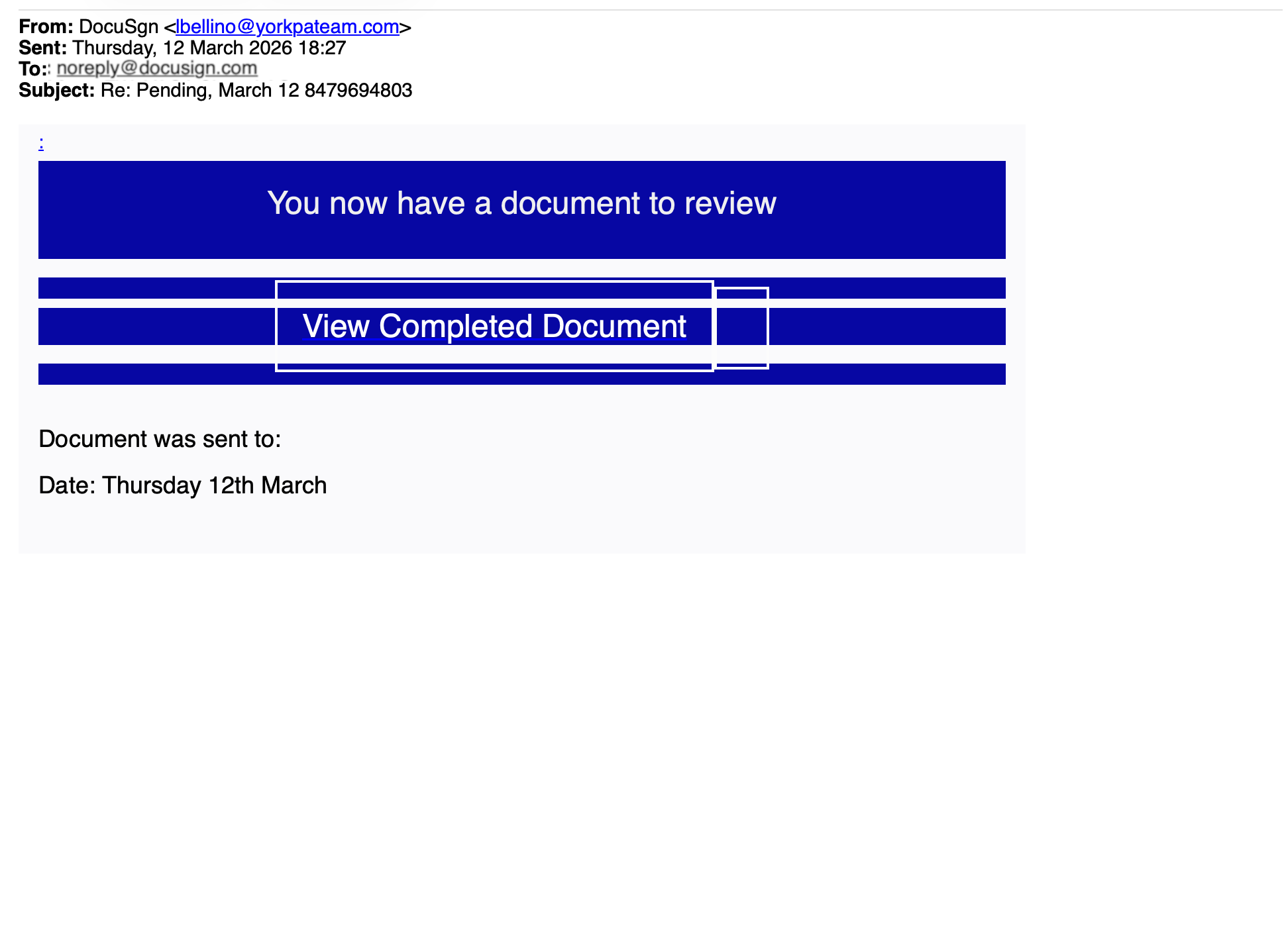
Trust building indicators:
- the "Re:" prefix is designed to look like an ongoing conversation
- the
noreply@docusign.comis designed to be recognized as an official account of Docusign and increase the trust level at cursory reading - the random number mimics an automated reference ID.
- the date in the subject implies urgency
The body contains a banner reading "You now have a document to review" with a prominent "View Completed Document" button.
Appended beneath the phishing lure is an entire multi-party email thread stolen from what appears to be a real company. The thread is stolen from a real and unrelated account. This stolen thread serves two purposes: it provides enough "clean" business content to help the email pass content-based spam filters, and it discourages careful reading: by the time you scroll through someone else's financial dispute, you've stopped questioning the DocuSign notification above it.
An anonymized exampl of the stolen thread is presented below as example:
From: Bob Fakerson bob@acmerobotics.fake
To: Jane Notreal jane@acmerobotics.fake, Tom Madeup tom@acmerobotics.fake, Sara Placeholder sara@acmerobotics.fake
Date: Thu, 12 Mar 2026 08:43
Subject: RE: ACME Warehouse Lease / equipment depreciation
I just looked into this and need to retract the depreciation schedule.
No updated asset lists were submitted by FakePath Holdings or Placeholder Advisory for Q1. The maintenance costs were allocated against the old depreciation entries instead of the updated asset register.
NotReal Ventures did submit their updated lists for Q1, which explains the discrepancy in the numbers.
I can resend the full schedule once all submissions are complete.
Apologies for the confusion.
Regards, Bob

From: Tom Madeup tom@acmerobotics.fake
To: Bob Fakerson bob@acmerobotics.fake, Jane Notreal jane@acmerobotics.fake, Sara Placeholder sara@acmerobotics.fake
Date: Thu, 12 Mar 2026 15:55
Subject: RE: ACME Warehouse Lease / equipment depreciation
Hi, I don't know what happened here with the depreciation figures, but this doesn't add up — we need to look into it.
Sara's allocation should be roughly similar to mine and that doesn't seem to be the case. I also don't recognize the write-off amounts attributed to my unit.
Kind regards,
Tom Madeup
CEO | Founder
+31 6 00 00 00 00
www.acmerobotics.fake
TOTALLY REAL COMPANY DOING REAL THINGS

From: Bob Fakerson bob@acmerobotics.fake
To: Jane Notreal jane@acmerobotics.fake, Sara Placeholder sara@acmerobotics.fake, Tom Madeup tom@acmerobotics.fake
Date: Thu, 12 Mar 2026 15:26
Subject: RE: ACME Warehouse Lease / equipment depreciation
Hello everyone,
Discussed this with Jane this afternoon. Here's my brief response.
The choice to reallocate the depreciation across business units is a management decision. You all agreed at the time to share warehouse capacity to keep Acme's overhead low. If you believe the current split no longer reflects actual usage, I'm open to revisiting it. I do think any revised model should apply equally to all units.
Same for the lease renewal terms — this is a board decision the three of you need to make together.
Finally: in February we completed a review of warehouse utilization. Current cost allocation per unit:
As of 12/03/2026Allocated CostFakePath Holdings B.V.€4,210Placeholder Advisory Group€9,870NotReal Ventures B.V.€22,340
Regards,
Bob

From: Jane Notreal jane@acmerobotics.fake
To: Bob Fakerson bob@acmerobotics.fake, Sara Placeholder sara@acmerobotics.fake, Tom Madeup tom@acmerobotics.fake
Cc: Dave Example | Dummy Accounting dave@dummyaccounting.fake
Date: Mon, 9 Mar 2026 15:47
Subject: ACME Warehouse Lease / equipment depreciation
Guys, this is what my accountant flagged. My unit has been absorbing almost €13K in depreciation costs for equipment that isn't even stored in our section of the warehouse. Please sort this out ASAP — same goes for all of you obviously. I want a clear plan for rebalancing.
We should also be reviewing the lease terms annually going forward.
@Bob — look into the equipment register and cross-check with the actual floor plans. PS: Dave said you can call him with questions.
@Tom/Sara — what does your side of the allocation look like? Please share your numbers.
Regards, Jane
Clicking the button takes the victim to a domain with no connection to DocuSign, Google, or the victim's organization. The web part of the attack has two stages:
- CAPTCHA gate: The victim first sees a fake "Human Check" page (browser tab title: "Secure Human Check") with a distorted character CAPTCHA. This serves to make the process feel secure, to build psychological commitment (once you've "passed" a security check you're more likely to continue), and critically, to block automated URL scanners and security crawlers from reaching the actual phishing page.
- Fake Google login. After passing the CAPTCHA, the victim is shown a near-perfect clone of the Google "Sign in to continue to Gmail" page. The victim's email address is already pre-filled in the email field, making it appear that Google is requesting routine re-authentication. The URL remains fake, not
accounts.google.com. Any password entered here is sent directly to the attacker.
What they're after: Google Workspace credentials. Since many organizations use Google Workspace for email, Drive, Calendar, and more, a compromised account gives the attacker access to sensitive business data, the ability to launch further phishing from a trusted mailbox, and a foothold for business email compromise (BEC) fraud.
How to stay safe?
- Check the sender address carefully: "DocuSgn" is not DocuSign, and any fake domain is not a DocuSign sending domain. Real DocuSign emails come from
@docusign.netor@docusign.com. - Do not trust emails sent to
noreply@docusign.comwhere you are in CC/BCC. Even if that account exists, the attackers have sent an email TO it, not FROM it. Docusign will simply ignore the scam message and won't even know that you are attacked if your email is in BCC. - Hover before you click: Check where buttons actually link to. If it's not
docusign.net, don't click. - Always check the URL bar: No legitimate Google login will ever appear on a third-party domain. If the address bar doesn't say
accounts.google.com, it's a phishing page. - Question unexpected context: If an email contains someone else's internal financial discussion below a DocuSign banner, something is very wrong.
- Respect browser warnings: If Cloudflare or your browser warns you about phishing, stop and close the tab.
- When in doubt, verify directly: Go to docusign.com and log in manually, or contact the sender through a known trusted channel. Report suspicious emails to your IT security team immediately.