Microsoft & Atlassian Impersonation Campaigns through typosquatting
Take action: There are a multiple of ways to type a string that looks like a major vendor name but is fake, and scammers are using them to steal your credentials. Don't click links in unexpected emails claiming to be from major vendors like Microsoft or Atlassian, even if they look urgent. Type the official website address directly into your browser or use your bookmarks. If you use a password manager and it doesn't automatically fill in your password on a login page, STOP immediately! That is a strong sign you're on a fake site.
Learn More
Two phishing campaign have been detected targeting Microsoft and Atlassian users through homoglyph domain spoofing (also called typosquatting). Attackers are using visually similar character substitutions to create fake domains that are difficult to distinguish from legitimate ones at a glance.
Users have reported receiving phishing emails over several days. The campaigns use rnicrosoft.com (using lowercase "RN" to mimic "m") and atlasslan.net (using lowercase "L" to mimic "i") to impersonate Microsoft and Atlassian services.
A homoglyph is a character or set of characters that looks identical or very similar to another character but is represented differently in computer systems. Attackers exploit this to create domains that appear legitimate to humans but are technically different.
Common homoglyph pairs used in attacks:
| Legitimate | Malicious | Example |
|---|---|---|
| m | rn | microsoft → rnicrosoft |
| w | vv | windows → vvindows |
| i / I | l / 1 | atlassian → atlasslan |
| o | 0 | google → g00gle |
| cl | d | cloud → doud |
| a | α | amazon → αmazon (Greek alpha) |
| e | е | meta → mеta (Cyrillic ye) |
Both scams are sent as emails designed to look like something requiring immediate attention: For the Microsoft scam it's a security alert allegedly warning that "anomalous activity" was detected and the account will be permanently disabled unless immediate action is taken. The sender is noreply@accounts.rnicrosoft.com. For the Atlassian scam it's an email that's formatted like a change in ticket status. The sender is: tech.support@[company]-atlasslan.net
See the screenshots of the scam emails below:
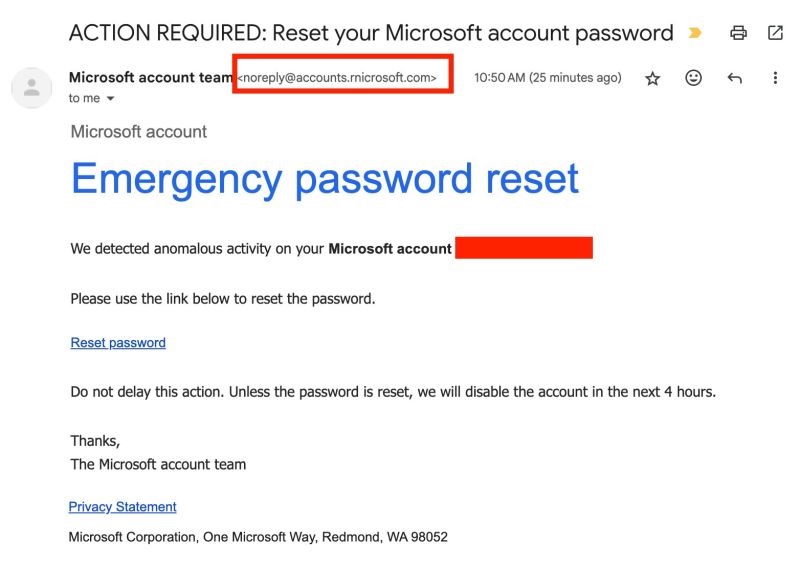
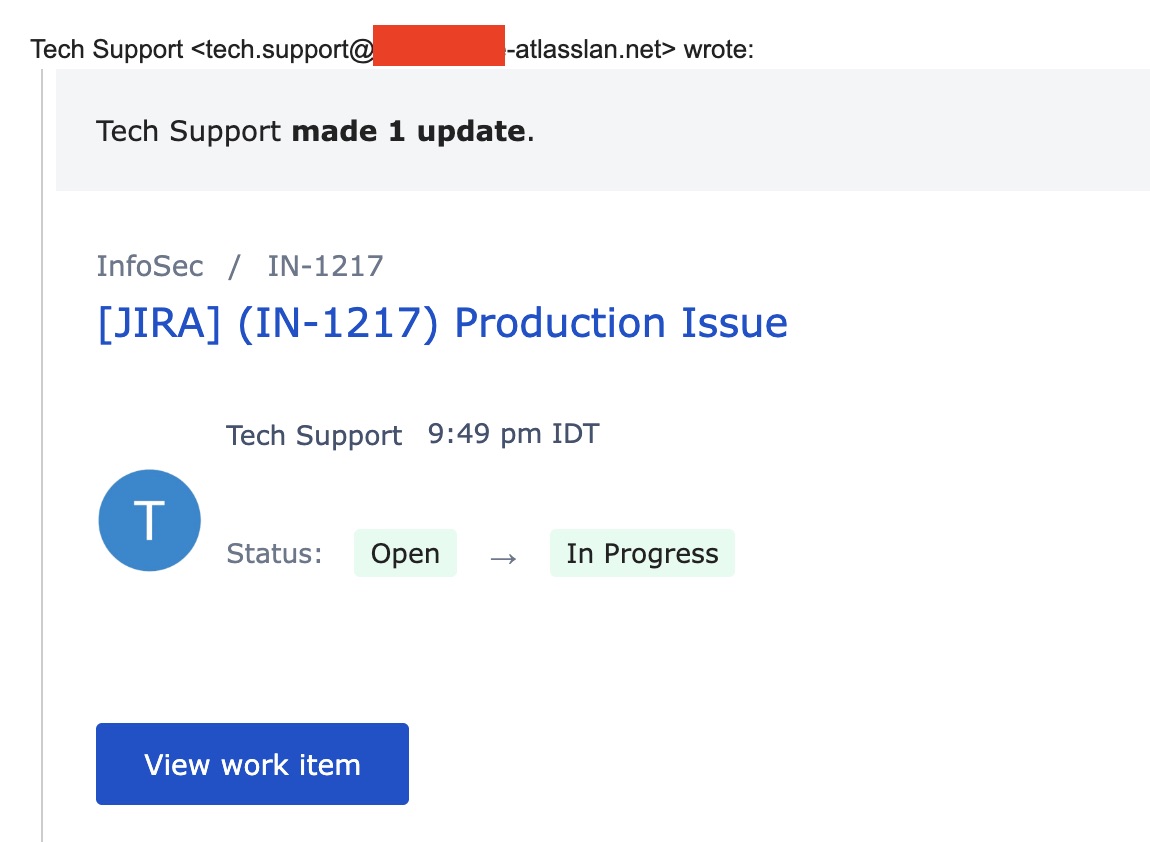
Both sites lead to a fake login page of the respective company (Microsoft and Atlassian) to steal credentials.
The attackers registered these domains and configured them with valid:
- Mail servers (MX records) to send emails
- SPF and DKIM authentication (passes email security checks)
- Valid SSL certificates (shows green padlock in browsers)
Why these emails are dangerous?
- The configuration is the same as a legitimate domain makes the standard email protections like SPF/DKIM/DMARC useless, since the domain has valid email configuration.
- Spam filters have limited effectiveness because the content is exactly the same as legitimate emails with the same content. On top of that, attackers user a technique called "warmup" where they send emails between the new domain and accounts they control on various major platforms like Outlook, Google, Yahoo to "train" the antispam filters into seeing these emails are normal and legitimate.
- SSL/TLS is useless as a control, all the scam emails and websites have encryption.
- User training may fail even if users are trained to check sender address. The sender email will pass cursory glance, so if the target is tired or in a rush, they won't notice the homoglyph.
How to stay safe(r)?
- Don't rush. If it's unknown and unexpected, take your time. Don't click on any links, download any files.
- Open official links in browser, don't click on the link or call phone numbers from the email.
- Consult with a technical person. They can dig deeper to check domain age, and notice the homoglyphs by changing the font.
- Use Password Managers. Password managers only autofill on exact domain match, so the typosquatted address doesn't help. If password manager doesn't offer to fill, STOP