WhatsApp users targeted in account takeover attack dubbed GhostPairing
Take action: Never trust unexpected cryptic messages on your messaging platforms, even from contacts you trust, especially if they have links or phone numbers to call. They are most probably phishing. Check your WhatsApp Settings → Linked Devices and remove any sessions you don't recognize.
Learn More
Security researchers are reporting a WhatsApp account takeover campaign dubbed "GhostPairing Attack" that exploits the messaging platform's legitimate device pairing feature to gain unauthorized access to user accounts.
The attack, first observed in Czechia in late 2025, manipulates victims into completing WhatsApp's own device linking flow through social engineering, effectively adding the attacker's browser as an invisible linked device on the target's account. The campaign operates through reusable phishing kits that can be quickly adapted for any country or language by simply changing the lure text.
The attack uses WhatsApp's phone number-based device pairing mechanism, which is a legitimate feature designed to link additional devices like laptops or web browsers to an existing account.
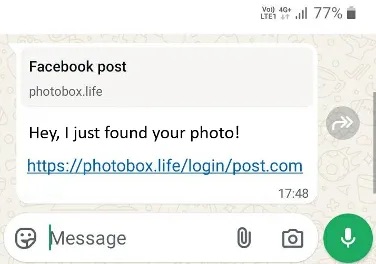
Lure message, Image courtesy of Gen Digital
Attack flow:
- The attack begins when victims receive messages from compromised contacts, typically containing brief, informal text such as "Hey, I just found your photo!" accompanied by a link that renders as a Facebook-style preview within WhatsApp.
- The links lead to fake Facebook lookalike domains including
photobox[.]life,postsphoto[.]life,yourphoto[.]life,photopost[.]live,fotoface[.]top, andtop-foto[.]life. These domains feature minimal pages displaying Facebook branding and colors to create a false sense of legitimacy. - When users click through, they encounter a fake Facebook viewer requesting verification before accessing the supposed photo. The page then either displays a QR code to scan or, more commonly, prompts users to enter their phone number followed by a numeric pairing code. Researchers note that attackers favor the numeric code method because it can be completed entirely on a single device, making it more practical for mass-scale social engineering compared to QR codes which typically require a second device to scan.
- After victims enter their phone number on the fraudulent page, the attacker's infrastructure forwards that information to WhatsApp's genuine device linking endpoint.
- WhatsApp generates a pairing code intended only for the account owner, which the attacker's site intercepts and displays back to the victim with instructions suggesting they should enter it into WhatsApp on their device to complete verification and view the photo.
- When victims open WhatsApp and enter this code at the pairing prompt, they unknowingly authorize the attacker's browser as a trusted linked device.
- From WhatsApp's perspective, the legitimate account owner has just approved a new session using the correct authentication code, making the entire process appear normal within the platform's security framework
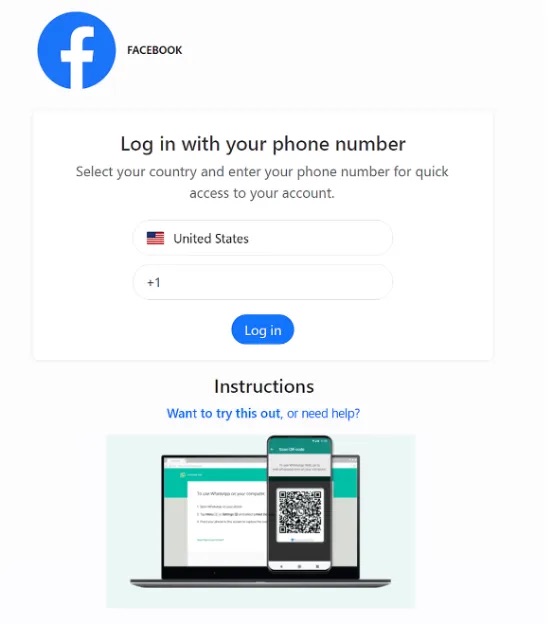 Fake login to enter the phone number, Image courtesy of Gen Digital
Once successfully linked, attackers gain access equivalent to any legitimate WhatsApp Web session, accessing all the data, history, contacts and conversations of the original WhatsApp session.
Unlike traditional account hijacking that locks out legitimate users, the victim's primary device continues functioning normally, leaving many users unaware that an attacker is monitoring their communications. The linked device remains active until manually revoked, potentially allowing attackers to observe conversations indefinitely.
Compromised accounts then become propagation vectors, with attackers using them to send the same lure messages to the victim's contacts and group chats, creating a snowball effect that expands the campaign through trusted relationships rather than cold spam.
WhatsApp users should immediately check their linked devices by navigating to Settings → Linked Devices and removing any unfamiliar sessions. Users should treat any external request to scan QR codes or enter pairing codes as highly suspicious and enable Two-Step Verification for additional protection.
This attack pattern extends beyond WhatsApp, as any platform employing device pairing through QR codes or numeric authentication has a similar attack surface (think Signal, Telegram, Viber etc)...